Monday, August 7, 2017

Wemo Smart Light Switch


When I purchased my home my outside lights were on a timer that would turn the lights on at night and off in the morning.  All was working great for a while until somehow the timer lost its settings and was either on or off all the time.  This was an older Intermatic timer that are infamously hard to program.  I  found a manual online and was able to get it programmed again but then about 6 months later it lost its settings again.  Frustrating.

So I decided to look at some of the new smart light switches.  These switched can be controlled remotely from your phone and programmed to turn on and off at sunrise and sunset.  There seems to be a lot of them out there but I kept landing back on the WEMO light switches.  They are relatively inexpensive and are reviewed pretty well.  Installation was easy if you are familiar with basic electrical work.   I am no expert but I can switch out a light when necessary.  Setup was pretty straightforward as well.  I couple things to keep in mind before purchasing.

  1. Make sure the outlet has a neutral wire, this switch will not work without one
  2. Make sure the switch is not 3-way, controlled by two switches.  This will not work either.
  3. Make sure you get good wireless reception where you will be installing the switch.  It will not work without a good signal.
Once you get the switch installed.  You need to download the app and it will guide you through the setup process.  It created its own temporary network that you need to connect to then you add and name your switch.  You can control the switch manually, from the app or set up rules to have the switch turn on and off at a certain time.  I used the sunrise/sunset settings which adjusts the on/off times throughout the year.  So far so good.  The app can be a little flaky as it has shown the light as on when it was really off a few times.  The app does have a refresh button that usually resolves the issue.  I have cut power to the house a few times and the switch had no problem reconnecting to the network.

This isn't a smart product that is going to save me any money but it is a nice set it and forget it product that replaced a switch that was giving me a headache.  I have a few more outside lights that are not on timers that I will probably upgrade at some point.  Great product that I highly recommend.    

Update: After 5 years my Wemo switch died.  Well the switch still works as in I can still turn on/off the light with it but it seems to have lost its wifi connectivity.  Which is the while point of the switch, if I can't run automations and schedules it is just a dumb switch.  It is showing as unresponsive in Alexa and even the Wemo app can't see it.  I tried factory resetting it and adding it back in but it was a no go.   I called their support line and after about an hour of trouble shooting the support rep also concluded that it was dead.  It was obviously out of warranty but I was at least expecting them to offer me a discount on a new switch.  But no.  So it now seems that there are other manufacturers offering similar switches for half the cost so I will post a new update when I get my new switch.  So at this point I would not recommend the Wemo switch.  I think a premium product such as this should last more than 5 years.

Saturday, August 5, 2017

Nest Protect - Smoke and Carbon Monoxide Detector


Having installed a couple Nest thermostats in my home and really liking them it made sense for me to take a look at their Protect smoke and carbon monoxide product.  The Nest Thermostat is expensive but the utility companies provide rebates and you will save money on your electricity and/or gas bill so for me the cost is justified.

The Protect provides no savings so the feature set would really need to blow me away in order to make the investment.  For me the feature set is just not there yet to justify the cost.  I have a large house, almost 5000 square feet of living space so obviously I have a lot of smoke and carbon monoxide detectors.  Although I did not realize how many I actually had until I walked around and counted them for this project.  I could not believe that I have 19 smoke or carbon monoxide detectors in my home.  Some of them are standalone carbon monoxide detectors which I could get rid of if I got the Nest Protects.  But that just brings the number down to 16.  So my cost to replace all smoke detectors would be almost $2000.  Not happening.

A few of my smoke detectors are hard wired so I may at some point replace some of those but will probably wait for the next generation to see if Nest will add to the feature set.  For me, at this point the cons far outweigh the pros as I see them.

Pros:
  • Remote Monitoring
  • Cool Factor
  • Night Light
Cons:

  • Cost - I can get a dumb smoke and CO detector for $30
  • They expire after 7 years - at the price it would be nice to get more than 7 years out of them
  • Limited Feature Set - The Ecobee thermostat has remote temperature sensors that can be added on so the temperature of your house is not just measured at the thermostat.  Would be great if Nest would put a similar sensor in the protect to extend the range of the thermostat.  There are probably all kinds of other sensors they could add to justify the cost such as air quality.
  • Product was initially buggy - A friend of mine has a couple Protects and remember him telling me that his would randomly tell him that there was smoke in the hallway at 3am.  There was no smoke in the hallway.  I think he has the first generation Protects and I don't think this is still occurring but it does give me pause. 
So for now it is a wait and see what happens with the next generation Nest Protect.  Maybe the price will come down.  Or maybe they will add a must have feature.  I really want to talk myself into getting a couple of these Protects but I just can't justify it, yet.


Saturday, July 29, 2017

Going Solar with Solar City

Installing solar panels on a home is a pretty big step but I think is the ultimate purchase one can make when looking to make your home smart.  The price of installing solar panels has come down in the past few years but it is still a pretty significant purchase.  My home is almost 5000 square feet has 2 AC compressors, and 2 kitchens.  I have my elderly mother living in an in-law.   So even though my house is pretty efficient my yearly electricity costs are fairly significant.  Given this it made a lot of sense to al least look into going solar.

Many solar companies have popped up in the past few years with different options to make getting solar more affordable. 

The most popular of those is a PPA or Power Purchase Agreement.   With a PPA the solar companies install the panels on your roof at no cost, they own and maintain the system and they get the benefit of any state or federal tax incentives.  You then buy the electricity that the panels produce from them at a rate lower than your utility.  These are usually 20 year contracts and the rate goes up through the contract.  There is some savings with a PPA.  But for me not enough to outweigh the disadvantages.  One major disadvantage of a PPA is if you were to sell your house before the contract is up the buyer would have to assume the contract.  This may scare some buyers away.

To maximize your savings though you really need to take advantage of the federal and state tax incentives.  Currently there is a 30% federal tax credit for your system through 2019.  It reduces after that.  My state also offers a $1000 tax credit. So there are significant savings to be realized.  Depending on the size system you have installed it could cost anywhere from $20,000 to $50,000 before incentives.  Many people don't have that mush cash laying around so many states offer a low cost solar loan.  I'm my state interest rates are under 4%.  Not a bad rate but you are still not maximizing your saving by paying interest.

I called Solar City for an initial consultation around the end of September 2016.  The initial consultation consisted of getting a copy of my electric bill and looking at satellite photos of my home to see if it would be a good candidate for solar.  My home passed this test so the next step was to have someone come out and look at my house and take measurements for a potential solar system.
Not every house id a good candidate for solar, there are various factors to look at to determine if it is worthwhile to install solar.

  • State you live in - Some states and utilities in those states make it difficult to install solar.  Also some sates offer better tax incentives than others.  In addition, if you live in an area where it is cloudy most days the energy generated will be minimized.
  • Condition of your roof - If you need a new roof, replace it before you consider installing solar panels.  Installing panels is expensive, you don't want to pay for it twice.
  • Orientation of your home -  Ideally the panels should be facing south to maximize the amount of sun.  If you don't have a roof plane facing south, that will minimize the amount of power your system can generate
  • Angle of your roof.  The panels have to point at the sun.  If you have a flat roof brackets may have to be installed to angle the panels toward the sun.  A 30- 45 degree roof pitch is ideal
  • Obstructions - If you have tall trees close to your home that will block the sun that will minimize the amount of power that your system can generate.
  • How long do you plan on living in your home - Payback on a solar system can be 10 years or more.  If you are planning on moving before your solar system starts paying you back it may not be a good investment.
The state I live in has great incentives and my utility offers net metering which means any excess energy that my panels produce goes back into the grid and I get a credit on my bill.  My house faces south, my roof is only a year old and is a 45 degree angle.  I have only been in my house for a year so I have no plans to move within the next 20 years so I am a pretty ideal candidate for solar and the solar rep agreed.  About 2 weeks later they sent me my solar design for a 26 panel 6.5 kwh system that they guaranteed would generate 85% of my power needs.  After all rebates and incentives my out of pocket costs would be just over $10,000 which would give be about a 10 year payback.  I decided to pay for my system upfront to maximize my savings.
My Solar Design

I probably could have paid less for a system by going with s smaller mom and pop solar company but I liked the idea of using Solar City with the backing of Elon Musk and Tesla and all the coming technology that would mesh nicely with a solar system.  Solar City guarantees the system for 20 years and I think they, if anyone, are going to stick around for the long term.  One factor that may be a show stopper for some is where the panels are installed on the house.  Some people just don't like the look of the panels and would not want them installed on the front of their home.  Luckily for me the back of my house faces south and you can't really even see the panels unless you walk to the back of my yard.  I don't mind the look of the panels but I think I would have been in for a fight with my wife if the proposal was to install on the front of the house.

After approving the design and signing the lengthy contract I had to get permission from my utility to build a solar system.  Luckily Solar City handles all if the legwork, all I had to do was forward the email once I got it.  That took a couple weeks and then they scheduled my install for the end of November.  Install went pretty smoothly, just make sure you are there when they install the system.   I have a finished basement and there were some wires from my panel to the inverter that needed to be pulled though walls and some questions that needed to be answered regarding placement of the inverter.  The installation took just one day but unfortunately you can; just start generating power right away.  I needed the town building inspector and electrician to inspect the system and the utility to authorize you to interconnect and turn your system on.  I think the utility also had to install a new net power meter. 

This was all completed by mid December when I was able to turn my system on and start generating power.   Unfortunately, December is one of the worst months for solar generation, with the sun low in the sky and short cloudy days the amount of solar energy I was generation was minimal.  This was to be expected though as Solar City laid everything out in my proposal.   Fortunately every month got better.  Solar city has a great mobile and web app that you can see current and historic power produced.  Some of my charts below.

Typical partly cloudy summer day.  My best day so far has been 36kwh

July has been a pretty good month.  The dips are the rainy days.
It is nice to see how much you are saving at any given time.


May should have been better but it rained a lot

I didn't see much savings for the first couple months but the last few months have been great.  My April electric bill was $25, May was $5, June I has a credit of a couple dollars and my July bill was about $30 due to the increased AC use. I am on track to save at least $1000 this year so that would give me about a 10 year payback on the system.  Overall I have been pretty happy with my system.  I am saving money and nut using fossil fuel to generate power for my home.

Finished Project


Feel free to post a comment if you have any questions about the process.

Thursday, July 27, 2017

Nest Rush Hour Rewards

When I purchased my Nest learning thermostats there was a link on the Nest website about saving some money by signing up for the Nest Rush Hours Rewards Program.  If your utility participates you can save some money by signing up.  My utility, National Grid, is a participant in the program and offers $40 for the first year and $25 for subsequent years.

They way the program works is on days during the summer when it is really hot and there is higher than normal energy demand.  Your utility will take control of your thermostat and pre-cool your house so that you are not using your AC during peak energy hours.  If it seems a little big brother it is.  Days when this happens are called energy rush hours and they usually notify you a few hours before they are going to happen.  They say there are usually between 6 and 12 a season and they only occur on weekdays.  The past few rush hours have occurred between 2pm and 6pm.  You can also override the rush hour at any time so if it is getting too hot you can just turn your AC down..  I got a bit of a creepy feeling about the program but with two thermostats that was $80 in savings for my first year so I figured I would give it a shot.

I am now in my 2nd year of the program and here are my thoughts....

  • The big brother aspect is kind of creepy and I think a lot of people will take issue with it and not sign up.  
  • There is not a whole lot of information on the program if you search the net.  My utility has a page and Nest has a page but that is about it.
  • Don't expect anyone at your utility to know anything about the program, When November rolled around and I still had not gotten paid I called National Grid Customer Service.  The rep know nothing about the program and suggested I contact Nest.  I directed her to the utility website but she still recommended I contact Nest.  I contacted Nest for due diligence and of course they told me to call my utility.   Kind of a run around, so I reached out to National Grid on Facebook and they told me that gift cards would be going out soon.  I did eventually get the gift card but I am not sure it was because I reached out or if they just send them out in December.
  • The gift cards that they send out are eCredit Cards and I had a hard time getting brick and mortar stores to accept them.  I eventually added it into my amazon account as a gift card but it was not as easy to use as it should have been.
  • I think there is a potential that the program could cost you more money in certain scenarios.  For example if I am away on vacation and my thermostats are in eco mode the AC may not go on during the day.  If a rush hour happens they may pre-cool an unoccupied house.  Not 100% sure if this scenario could actually happen but if it does it would cut down on potential savings.  It is something that I am going to look out for and confirm this season.
Kind of an interesting program, that I am hesitantly staying on.  I figured I would take it on a year to year basis and cancel if there is no benefit.

Update:
As I suspected the Rush Hour Reward program can cost you more money as there appears to be a bug in the system.  I was out of the country for a few days and both thermostats were in away mode.  I was notified of an energy rush hour and confirmed that it did not pre-cool my home since I was away.  Good!  I logged on later on after the energy rush hour was over and my AC was on.  So it looks like somehow the end of the energy rush hour causes the AC to kick on even if the thermostat is in away mode.  I may call Nest Support to report this and will update with any response I get.

Update 2:
I contacted Nest via chat the other night to report the above bug and the support guy thanked me for the info and suggested that I call National Grid.  He told me that what happens during Rush Hour is controlled by the utility so there was nothing Nest could do.  I don't really buy that and I don't expect to get anywhere with National Grid based on my past experiences so I will probably leave it at that and just monitor closely whenever there is an energy rush hour. 

Nest Learning Thermostat


The Nest Learning thermostat was the first smart product that I purchased for my home.  When we purchased our home in 2016 it had two different models of programmable thermostats.  One for the second floor and one for the first floor and basement.  These were controlling two forced hot air gas furnaces.  I knew heating and cooling a 5000 square foot house wasn't going to be cheap so I needed to do something.

The programmable thermostats that I had installed were a beast to program and I am a programmer by trade. I really wanted something easier to use so I started looking at the Nest thermostats.  But at $250 each that was a lot of money.  Luckily they go on sale every summer for $200 and my utility has a $100 rebate on the thermostats so I was able to get them for $100 each.  Still more expensive than a standard programmable thermostat but for the extra functionality I think it is worth it.

Installation was pretty simple.  I am fairly handy so I am not afraid of a little DIY.  The base has a built in level and they give you a cool little screwdriver for installation.  The app will walk you through the rest of the steps and then it is pretty much set it and forget it.  The first couple weeks after installation the thermostats are in learning mode so you need to manually adjust for comfort.  The thermostats have motion sensors so that know when someone is home or not.  They also use geo-fencing so you can tie them to your phones and the thermostats know when you are away so they turn your heat or AC up or down accordingly.

I have had my thermostats installed for a year now and am pretty satisfied.  I don't have a lot of history in my house so I don't know how much I am actually saving but Nest claims up to 15%.  I am in New England so my heating bills are higher than my cooling bills but I can definitely tell that my furnace/blower is not running as much.

The app is really nice.  My only gripe is I wish they provided more than 10 days of history. This is a google company after all.  I love data analytics and it would be nice to be able to export this data to a spreadsheet and do a year by year comparison.  The only other warning is that HVAC guys seem to hate Nest thermostats.  I had a couple HVAC guys come to give me estimates for a new furnace and when they saw I had Nests, they all had some negative comment about them.  One guy told me they he had to replace a bunch because they weren't working.  Another guy warned me about them as well.  I kind of think that the "trade" guys don't like a technology company coming on their turf.

Overall I am pretty happy with my Nests.  They look really cool.  The ability to see and control my thermostats from anywhere is great.  Integration with other smart products is something that I am looking forward to down the road as well.  Best of all I am saving money on heating and cooling without having to worry about it.  For additional savings some utilities offer what is called the Nest Rush Hour Rewards program.


Arlo Pro Wireless Cameras


I started looking to get some kind of video surveillance system for my house about a year ago.  Initially I was looking pretty closely at the wired DVR based systems.  But there were a few characteristics of these systems that made me hesitate.  First, the need to hire an electrician to install the system.  I could attempt to install myself but the idea of crawling around my attic and up on ladders did not get me excited.  Second, I don't like the idea that all of the recording sit on a DVR in your home.  If a thief breaks in they can just steal the DVR and all the evidence.  Finally, most of the DVR based systems have really bad apps.  As a software developer I appreciate a nice user experience and most of these just do not provide it.

My must haves for a system were:

  • Outdoor rated
  • Wireless
  • Free Cloud Storage
  • Long battery Life
  • Modern mobile app / website

So, I started looking at "smart" video surveillance systems, the two that really interested me were Ring and Arlo.  I initially was looking at Ring but two things swayed me. First, you needed to pay a monthly fee for cloud storage, I did not want to pay for cloud storage.  Second, you needed to hard wire the camera to your doorbell.  My doorbell was not working so that would mean hiring an electrician to get it fixed.  So I started looking elsewhere.

The original Arlo cameras looked very promising but I was reading some reviews about delays in recording.  Also the original Arlo cameras used regular batteries which would need to be replaced every few months.  So it seemed to me that the technology just wasn't where I needed it to be yet, I figured I would wait and eventually the tech would catch up.

Fast forward about 6 months, in November of 2016 Netgear released their Arlo Pro cameras.  These cameras provided everything that the original Arlo camera's plus rechargeable batteries that promised 3-6 months of charge.  I have had my Arlo Pro Camera for 9 months not and I have to say I love them.

There are a couple cool features that this camera system has that I have yet to use.  The base station has an alarm built that can be triggered by motion or manually.  Triggering on motion wouldn't work for me as it would not be fun to be woken up at 3am because a cat walked by my camera.  Where I think this could be useful is if someone breaks in, the camera would notify me and then I could manually trigger the alarm.  Hopefully I will never have to do this.

Another cool feature that I have yet to use in the USB storage.  Basically you plug a USB flash or Hard drive into the base station and all videos are saves on the device along with the cloud.  Nice feature to get more that 7 days history.  I need to pick up a flash drive one of these days so I have a backup.

The last couple features that I have yet to use are geofencing and  Arlo Smart.  Geofencing allows you to turn camera and notifications on and off when you phone enters and exits a predefined zone.  I keep my camera armed at all times and occasionally disarm them if I am working in the yard so I don't get a bunch of unnecessary notifications and videos.   Arlo Smart is a paid service that uses AI to categorize the type of motion detected as people, animals, vehicles and others and then allows you to choose notifications for certain categories.  They give you a 30 day free trial and then charge $3.99 per camera per month after that.  I think Netgear is missing the boat a bit on the Arlo Smart feature.  I as well as many buyers went with Arlo over the competition because there was no monthly fee.  Now they want to charge for a feature that to me is not really needed.  I don't get many false notifications and don't really care id a car or person pulled in my driveway, I still want to know.

Pros:
  • Wireless - Easy Install
  • Free 7 day cloud service
  • Long life Rechargeable batteries
  • Solar Panel for charging batteries
  • Alarm Built into base station
  • Works with Amazon Echo Devices
  • USB Storage
  • Geofencing
  • Great App
Cons:
  • System is a bit pricey
  • non-continuous recording
  • Video quality - not 1080p
Overall these cameras are exactly what I was looking for.  I have a two camera system.  Setup was a breeze.  I tool me under an hour to get both cameras set up.  Battery life is as promised.  The more activity the camera has the less time the battery will last.  My front camera that does not get much activity batteries lasted about 7 months.   My side camera that is very active batteries last about 2 months.  But now with the addition of the solar panel I don't expect to ever have to charge the batteries.

The cameras are great but they aren't perfect.  They are a bit pricey, a four camera system will cost you over $500 add a few solar panels and  mounts and you can quickly get north of $1000.  The product literature claims High Definition video.  The quality is not 1080p and think it gets compressed which lowers the quality even more.  I have seen competing camera videos that are definitely higher quality.  All in all though I will take the pros over the cons.

As of this writing Amazon announced that Arlo Cameras now work with the Echo Show so you can get a live feed of your cameras.  Just one more reason for me to love these cameras. 

Monday, June 26, 2017

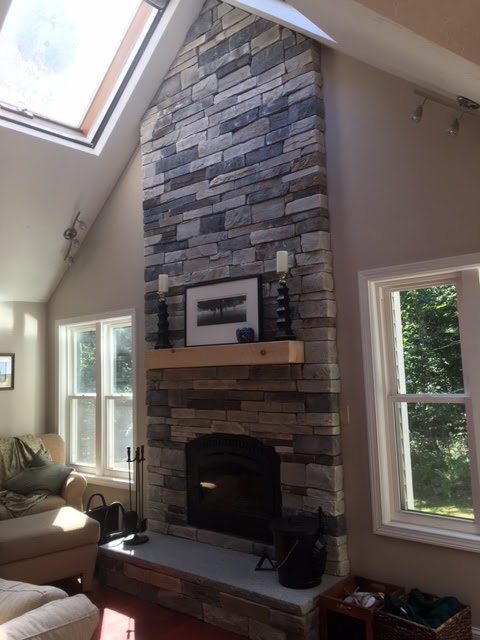
Fireplace X 36 Elite Wood Fireplace

Compared to some of the other "Smart" products that I have installed in my home this wood burning fireplace doesn't make my life any easier.  On the contrary it makes it harder.  I have to gather, split and stack wood.  I have to load the fireplace and clean out the ashes.  As far as being environmentally friendly I guess it is not.  The smoke it releases is not good for the environment, but it is 85% efficient and I am not burning fossil fuels which I like.


My previous home had an older Waterford wood burning stove in the family room which I loved.  Yes it is a lot of work but there is nothing like a crackling fire on a cold winter night, and we have a lot of cold winter nights in New England.  So when we purchased my new home with an older inefficient fireplace I knew I wanted to replace it with something more efficient that I could use and would save me some money.  My home has two gas forced hot air furnaces as well as a gas stove in the basement to heat the in law apartment.  I knew my New England winter heating bills would be high and wanted to do something to offset them.


So we started looking into options.  Most places tried to talk us into a gas appliance due to cost and ease of use.  I really wanted a wood burning unit and I knew there were some options and we finally found a store that was able to make some suggestions.  They recommended the Fireplace X 36 model and had an installer that they work with that would do the work for us.  The installer came out a few weeks later and confirmed that the unit could be installed in out space and gave us an estimate.  Overall the entire job cost us around $10,000.  Pretty pricey but for us it was worth it.  The cost broke down as follows

Stove - $3000
Stove Face $1000
Chinmey Parts - $1000
Stone, hearth and mantle - $2500
Labor - $2500

The above are rough estimates from memory but I think they are pretty close.  We probably could have saved some money by going with cheaper stone but we decided to invest some money there.  The stove installation was completed in February so I only have a couple months of experience using it but overall I am pretty happy.

I am still learning about the stove and how to run it and I am sure that will continue this coming season.  One of the cool features of the stove is the posi-pressure system.  Rather than taking warm air from inside of your house the stove have a vent and fan to outside which brings in cold air circulates it around the firebox and blows it into your house.  This feature is supposed to pressurize you house and seal all of the cold air drafts.  I can definitely tell it is pressurizing my home as the ceiling fan in the room where the wood stove is spins backward when the fan kicks on.  Kind of freaked me out the first time it happened.


The sell different color and style faceplates for the stove and I found it kind of odd that the faceplate is sold separately from the stove.  They stove did come with a thermostat, a moisture sensor, gloves, touch up paint for the face and a grate which I removed as it made it difficult for me to clean out ashes.

The product brochure claims 10 hour burn times.  I haven't gotten close to than I am more like 5 or 6 but that could be my learning curve on the stove as well as the quality of wood I was burning last year.   I have 2 seasoned cords stacked and ready for this year.  Hopefully that will be enough, I was surprised how much wood I went though in the short time I used the stove.


Pros
EPA Certified
High quality product
Looks Great
Puts out a ton of heat - Heats my 3500 square foot house


Cons
Eats a lot of wood
Glass gets dirty
Can get smoky if you aren't careful
No cleanout drawer - can be messy getting the ashes out
Catalytic - will need to eventually replace the catalytic combustor


Overall I really like the stove and hope to continue to learn  how to use it more efficiently this season